


PDFs are everywhere in Salesforce projects.
For a long time, the most common approach was to render a Visualforce page as a PDF. Visualforce still works, but now you can also generate a PDF directly from Apex using Blob.toPdf(). (Salesforce Developers)
In this blog, we’ll build a very simple PDF and save it as a Salesforce File attached to an Account.
What you’ll build
- Query an Account
- Create a small HTML string
- Convert HTML → PDF using Blob.toPdf()
- Save the PDF as a File using ContentVersion
- Attach it to the Account automatically
Quick demo: Run this in Execute Anonymous
					Account acc = [SELECT Id, Name FROM Account LIMIT 1];

String htmlContent =
    '<html><body>' +
    '<h1>Hello, ' + acc.Name + '!</h1>' +
    '<p>This PDF was generated with Blob.toPdf().</p>' +
    '</body></html>';

Blob pdfBlob = Blob.toPdf(htmlContent);

ContentVersion cv = new ContentVersion();
cv.Title = 'HelloAccount.pdf';
cv.PathOnClient = 'HelloAccount.pdf';
cv.VersionData = pdfBlob;
cv.IsMajorVersion = true;
cv.FirstPublishLocationId = acc.Id; // attach to the same Account

insert cv;

System.debug('PDF created for Account: ' + acc.Name + ' | ContentVersion Id: ' + cv.Id);
Where do you find the PDF?
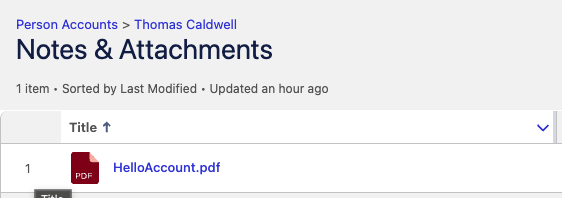
After running it:
- Open that Account
- Go to the Files related list
- You should see HelloAccount.pdf
Because you set FirstPublishLocationId, Salesforce publishes the file to that record when the first version is created. (Salesforce)
How it works
1) HTML is just a String
You’re building basic HTML like:
- <h1> for a heading
- <p> for a paragraph
Then Salesforce converts that HTML into a PDF.
2) Blob.toPdf() creates the actual PDF binary
Blob.toPdf(htmlContent) returns a Blob, which is the binary data of a PDF file. (Salesforce Developers)
3) ContentVersion saves it as a Salesforce File
In Lightning, Files are stored using:
- ContentVersion (a specific version of the file)
- plus linking records behind the scenes (or explicitly via ContentDocumentLink when you choose) (Salesforce Developers)
Conclusion
Generating a PDF in Salesforce can be simple and flexible. In this blog, you saw how to create a PDF using Apex with Blob.toPdf(), save it as a Salesforce File using ContentVersion, and attach it directly to a record.
Salesforce provides many ways to build solutions, and that’s a good thing. You are free to choose whatever approach works best for your project and your team. Sometimes one option feels right, sometimes another one does — and that’s completely okay.
This Apex approach is easy to try, quick to test. If you haven’t used Blob.toPdf() before, give it a try in your developer org / sandbox and see how it fits into your project.
Keep experimenting, keep learning, and build what works best for you