



Task 1: Audit Custom Fields with No Detected References
The problem: Salesforce orgs often have custom fields left over from older projects. Some may no longer have any references in the metadata you maintain.
Sample prompt:
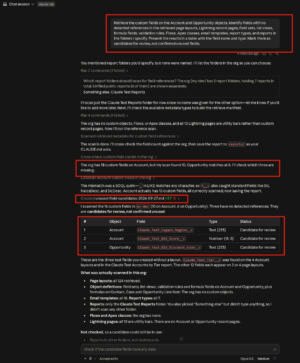
“Retrieve the custom fields on the Account and Opportunity objects. Identify fields with no detected references in the retrieved page layouts, Lightning record pages, field sets, list views, formula fields, validation rules, Flows, Apex classes, email templates, report types, and reports in the folders I specify. Present the results in a table with the field name and type. Mark them as candidates for review, not confirmed unused fields.”
What Claude produces: A list of custom fields with no detected references in the metadata it can access.
Your review step: Reports need extra attention because the Metadata API does not support wildcard retrieval for reports. Claude can only check the reports and folders included in your retrieval.
You also need to check for references outside the retrieved metadata. These can include integrations, external reporting tools, data loads, managed packages, Workflow Rules, and Process Builder automation.
Salesforce doesn’t provide a deactivate option for custom fields. Confirm with the field owner before removing a field from layouts, changing field-level access, or deleting it.
Task 2: Generate Permission Set Documentation
The problem: Finding who has specific permissions can take time when an org has many permission sets.
Sample prompt:
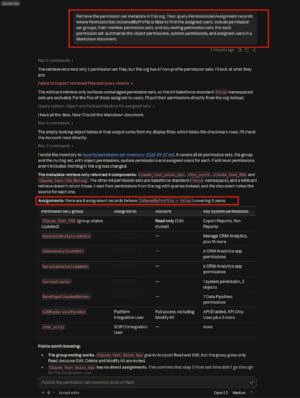
“Retrieve the permission set metadata in this org. Then query PermissionSetAssignment records where PermissionSet.IsOwnedByProfile is false to find the assigned users. Include permission set groups, their member permission sets, and any muting permission sets. For each permission set, summarize the object permissions, system permissions, and assigned users in a Markdown document.”
What Claude produces: A document showing the permissions in each permission set, the permission set groups that include it, permissions removed by muting permission sets, and the users assigned to it.
Your review step: Check several permission sets against Salesforce Setup, especially ones that grant sensitive permissions like Modify All Data and View All Data.
Permission set assignments are stored as records in Salesforce. The actual permissions are part of the permission set metadata.
Users can also get permissions through their profiles, which this query doesn’t include. Session-based permission sets can also grant access during a session. The document therefore doesn’t show a user’s complete effective access.
Task 3: Review Flows for Missing Fault Paths
The problem: Some Flow elements can fail and may need fault paths for custom error handling. Without a fault path, users can see an unhandled fault message, and Salesforce sends an error email to the configured recipient.
Sample prompt:
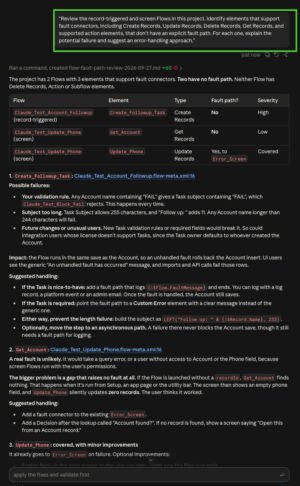
“Review the record-triggered and screen Flows in this project. Identify elements that support fault connectors, including Create Records, Update Records, Delete Records, Get Records, and supported action elements, that don’t have an explicit fault path. For each one, explain the potential failure and suggest an error-handling approach.”
What Claude produces: A list of Flow elements that may need fault handling, along with possible ways to handle the errors.
Your review step: Decide which recommendations fit your org’s error-handling approach. Make the changes in a sandbox and test both successful and failed scenarios.
Task 4: Draft Validation Rules from Business Requirements
The problem: Stakeholders usually describe business requirements in plain language. Salesforce validation rules need formulas.
Sample prompt:
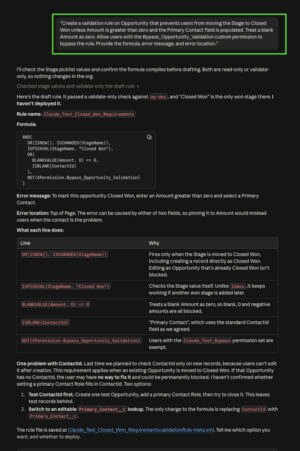
“Create a validation rule on Opportunity that prevents users from moving the Stage to Closed Won unless Amount is greater than zero and the Primary Contact field is populated. Treat a blank Amount as zero. Allow users with the Bypass_Opportunity_Validation custom permission to bypass the rule. Provide the formula, error message, and error location.”
What Claude produces: A draft validation rule with the formula, error message, and error location.
If your org uses a custom lookup field named Primary_Contact__c, the formula may look like this:
AND(
    ISPICKVAL(StageName, "Closed Won"),
    OR(
        BLANKVALUE(Amount, 0) <= 0,
        ISBLANK(Primary_Contact__c)
    ),
    NOT($Permission.Bypass_Opportunity_Validation)
)
If you use the standard field instead, replace ISBLANK(Primary_Contact__c) with ISBLANK(ContactId).
Your review step: Check that the field API names match your org.
Before creating a custom field, check whether Salesforce already provides what you need. Opportunity has a standard ContactId field that stores the ID of the contact marked as Primary in Opportunity Contact Roles. You can use this field to require a primary contact without creating another lookup field.
Validation rules can’t directly check Opportunity Contact Role records. If the requirement is to make sure an opportunity has a primary contact, the standard ContactId field is worth considering.
Test both valid and invalid records. Also test bulk updates, data loads, integrations, and record-triggered automation because validation rules can run in these situations.
For a controlled bypass, use a custom permission instead of tying the exception to a specific profile.
Task 5: Compare Metadata Between Sandbox and Production
The problem: Sandbox and production can drift apart over time. Before a release, admins need to know what changed between the two environments.
Sample prompt:
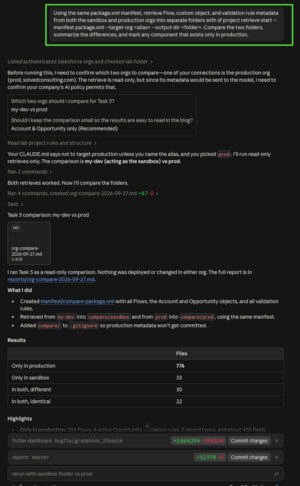
“Using the same package.xml manifest, retrieve Flow, custom object, and validation rule metadata from both the sandbox and production orgs into separate folders with sf project retrieve start --manifest package.xml --target-org <alias> --output-dir <folder>. Compare the two folders, summarize the differences, and mark any component that exists only in production.”
What Claude produces: A summary of the differences between the two environments, with possible conflicts called out.
Your review step: The comparison only covers the metadata types and components in your manifest.
Check every component that exists only in production. It could be something someone changed directly in production, but it could also come from a managed package or a Salesforce feature.
Before deploying, bring genuine production changes back into your sandbox or source control. This helps prevent you from overwriting changes that already exist in production.
Task 6: Write SOQL Queries for Data Cleanup Reports
The problem: Standard reports don’t always answer detailed data-quality questions.
Sample prompt:
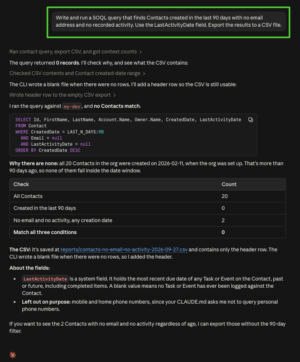
“Write and run a SOQL query that finds Contacts created in the last 90 days with no email address and no recorded activity. Use the LastActivityDate field. Export the results to a CSV file.”
What Claude produces: A query like this, along with the results and a local CSV file:
SELECT Id, FirstName, LastName, Account.Name, CreatedDate
FROM Contact
WHERE CreatedDate = LAST_N_DAYS:90
AND Email = null
AND LastActivityDate = null
To save the results as a file, Claude can run:
sf data query --query "<query>" --result-format csv --output-file contacts.csvYour review step: Compare the record count with a quick Salesforce report.
LastActivityDate reflects the most recent activity date available for the record. Check your org’s activity data before treating the results as a final list of Contacts with no activity.
Query results sent to an AI tool leave your org, so avoid querying sensitive fields unless your organization’s policy allows it.
Task 7: Prepare Deployment Packages with a Change Summary
The problem: Release documentation takes time that admins could spend on configuration and testing.
Sample prompt:
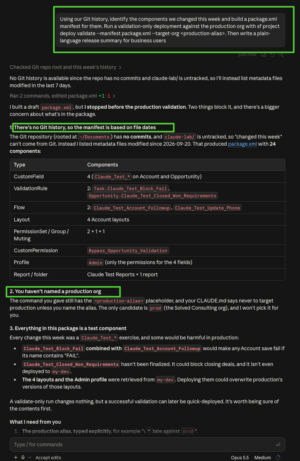
“Using our Git history, identify the components we changed this week and build a package.xml manifest for them. Run a validation-only deployment against the production org with sf project deploy validate --manifest package.xml --target-org <production-alias>. Then write a plain-language release summary for business users.”
What Claude produces: A manifest, validation results, and a release summary that can be used for a change advisory board or release email.
Your review step: Claude can identify recent changes from Git history if your project uses Git.
Salesforce source tracking can also show differences between your local project and supported sandbox orgs. It isn’t a history of everything changed during a particular week, though. Production orgs don’t support source tracking.
If you don’t have Git history or useful source-tracking information, give Claude the list of changed components yourself.
Read the release summary from a business user’s perspective. Remove technical terms they don’t need and make sure the component list matches the actual change request.
Pay close attention to permission sets. In API version 40.0 and later, retrieving permission set metadata includes all content exposed through the Metadata API. A deployment must include the full permission set metadata to avoid unintentionally overwriting existing permissions.
If the package includes Apex, remember that production deployments run tests. The coverage requirement depends on the test level.
With RunSpecifiedTests, the tests you run must provide at least 75% coverage for each Apex class and trigger in the deployment package.
With RunLocalTests, which is the default for production deployments that include Apex, Salesforce runs all local tests and requires at least 75% overall org coverage. Every trigger must also have some coverage.
Conclusion
Claude doesn’t replace an Admin’s judgment. It can handle repetitive research, comparisons, queries, and first drafts while you focus on the decisions that need your Salesforce knowledge.
Start with one task from this list. Test it in a sandbox, review the results, and add more tasks to your workflow once you’re comfortable with the process.